This article tells you how to complete sender authentication so that emails are sent from your email address
The default email address used to send registration confirmation emails and other emails to families is support@activityhero.com. This means that replies also go to this email address, and the ActivityHero support team must forward emails to you.
To receive emails directly from families, we need to do a one-time sender authentication with our email sender SendGrid. This helps increase the deliverability of emails and enables registration emails to come from your email address so that families can reply directly to you.
To take this step, let us know who your website DNS host is (e.g., GoDaddy, Rackspace, or Cloudflare). You need access to edit DNS records. After we know who your website DNS host is, we send you an email from SendGrid with instructions on what to do.
The email from SendGrid has a list of records to add to your DNS host. This is an example:

If your domain is hosted on GoDaddy, you see Manage My Domain, and then select DNS on the left side. From there, click Add New Record. If you use a different domain host, look for where you can manage your domain and DNS records.
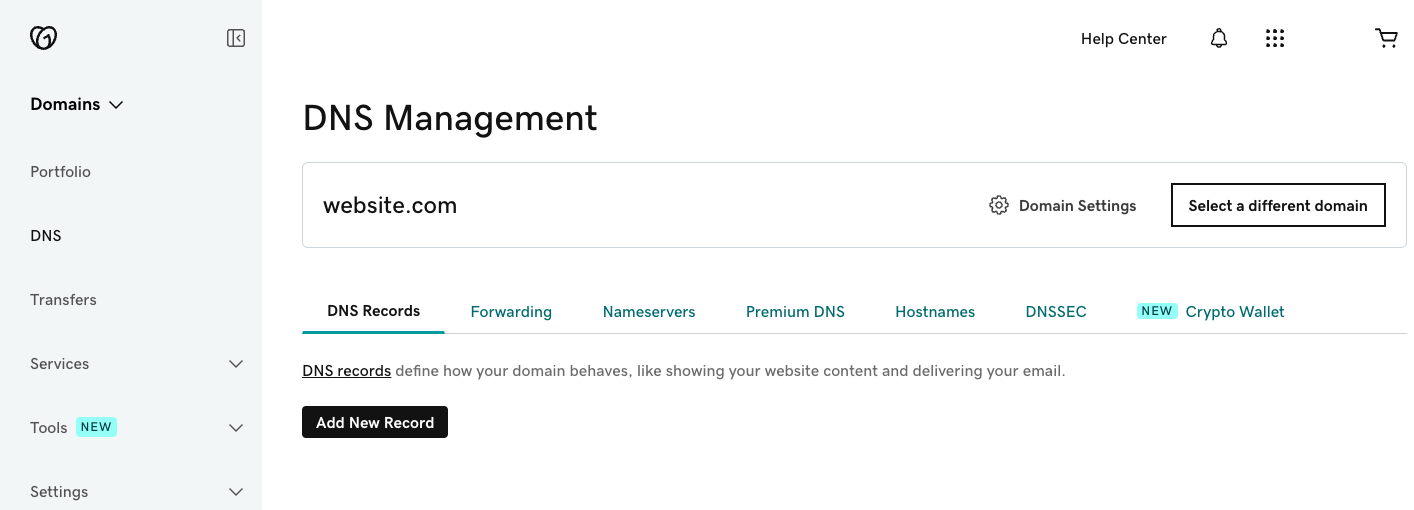
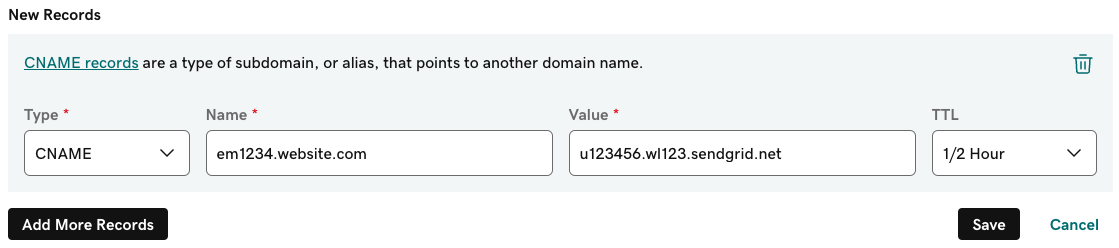
Follow the instructions in the email you receive from SendGrid. Copy the values from SendGrid to create new DNS records. This is an example of how you create new DNS records on GoDaddy.
Was this article helpful?
That’s Great!
Thank you for your feedback
Sorry! We couldn't be helpful
Thank you for your feedback
Feedback sent
We appreciate your effort and will try to fix the article