ActivityHero provides a central location for accessing all your reports from registration data and attendance tracking to custom and premium reports. This page gives you organized access to your data, making it easy to review, take action, and make informed decisions for your listings.
All Registrations
Summary by Session
Summary by Participant
Emergency Contacts
Student Details
Discount Report
Registration Export
Addresses
Attendance Reports
Custom Reports
Premium Reports
To get started, navigate to Registrations & Payments > Registration Reports from your dashboard. The All Registrations report opens by default, but you can explore additional reports from the menu on the left-hand side.
All Registrations
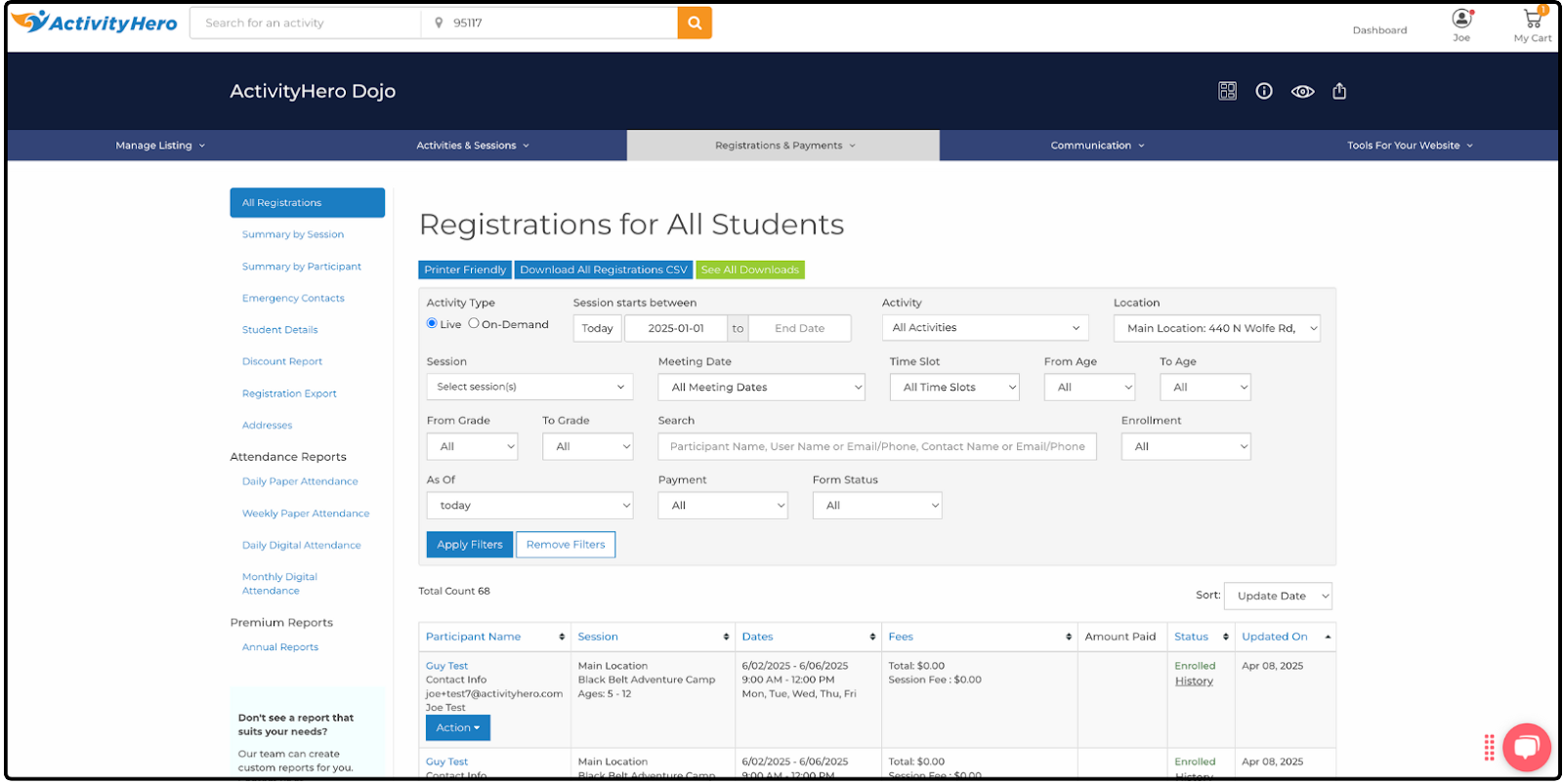
The All Registrations report is the first and most frequently used report on the Registration Reports page. It provides a complete list of registration data, which you can download using Download All Registrations CSV at the top. Note: This report often includes more data than you need, so the Registration Export report (covered later) can be a better option for simpler exports.
You can use the filters at the top to quickly find any participant, and the Action menu allows you to manage individual registrations directly from the report. For more details on available actions, check out our help article: What Actions can I do on the Registration Report?
Data displayed in this report includes:
- Participant Name
- Session
- Dates
- Fees
- Amount Paid
- Status
- Updated On
Summary by Session ↑
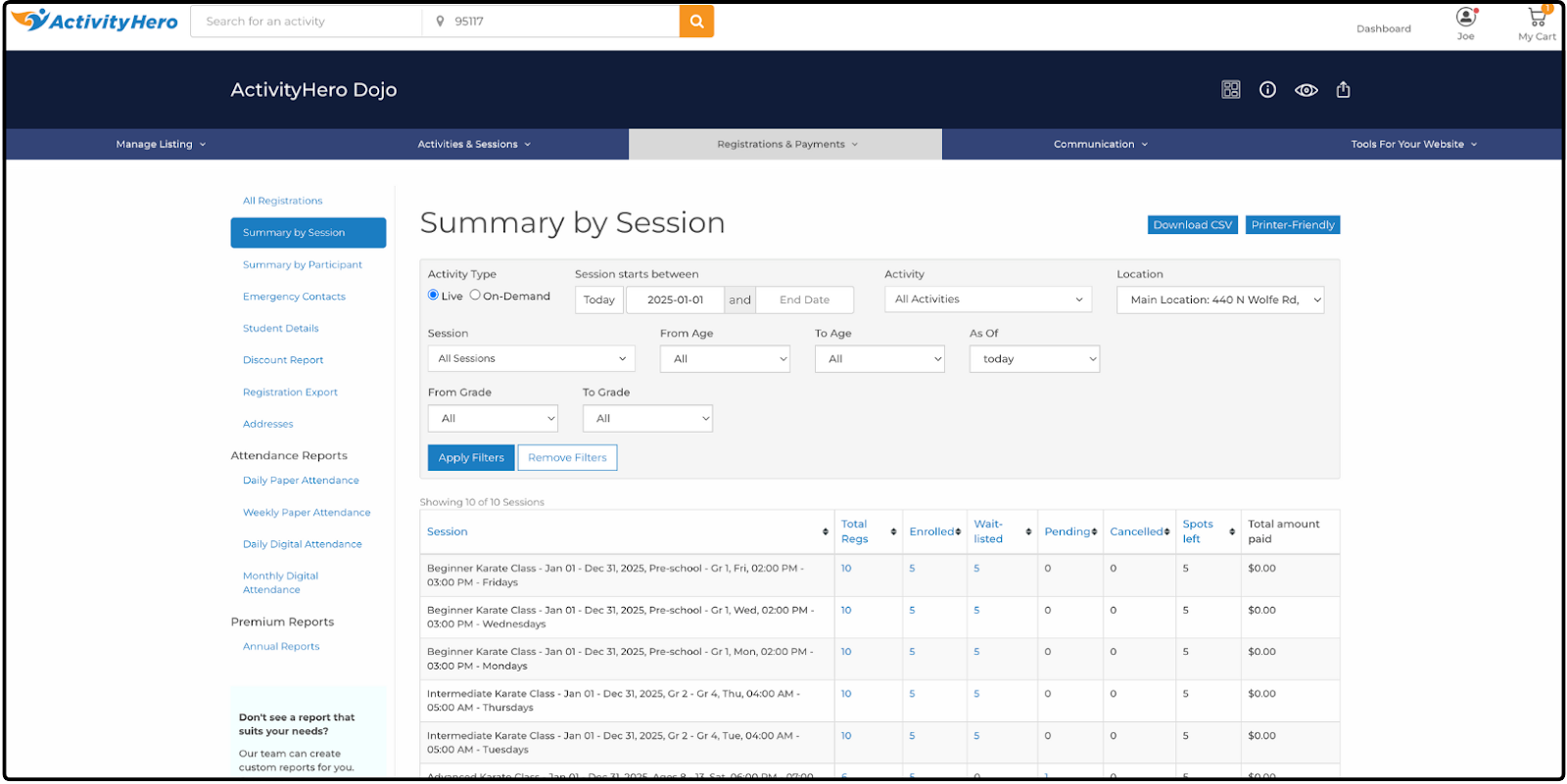
The Summary by Session report provides a quick, high-level view of all your sessions at a glance. It shows key details such as total enrollments, remaining spots, and the total revenue generated for each session. This report is especially helpful for planning staffing needs or making marketing decisions.
Data displayed in this report includes:
- Session
- Total Regs
- Enrolled
- Waitlisted
- Pending
- Cancelled
- Spots left
- Total amount paid
Summary by Participant ↑
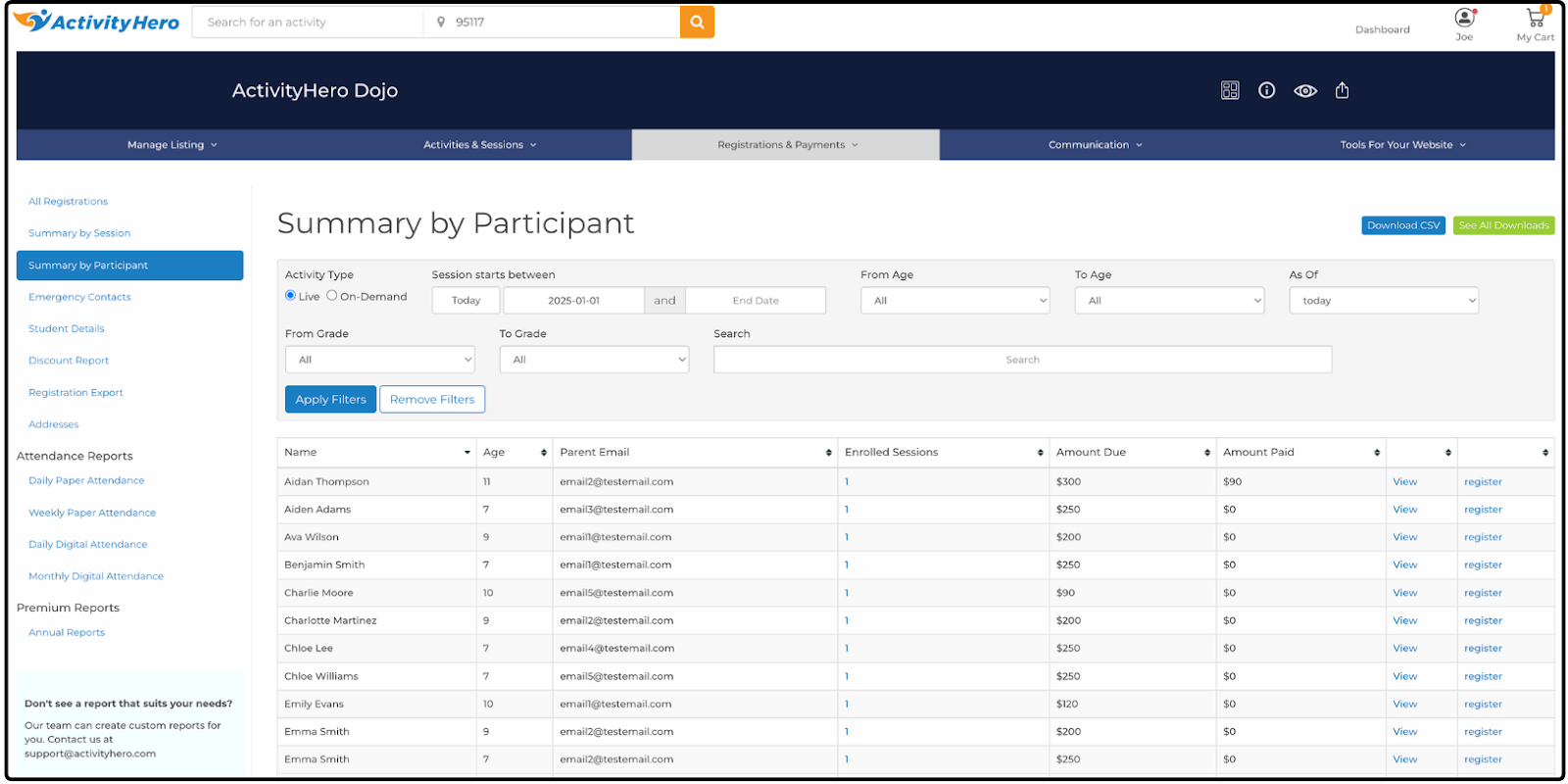
The Summary by Participant report provides a breakdown of key information for each participant. It helps you identify who has attended the most sessions and who has spent the most on your programs.
Data displayed in this report includes:
- Name
- Age
- Parent Email
- Enrolled Sessions
- Amount Due
- Amount Paid
- (View)
- (Register)
Emergency Contacts ↑
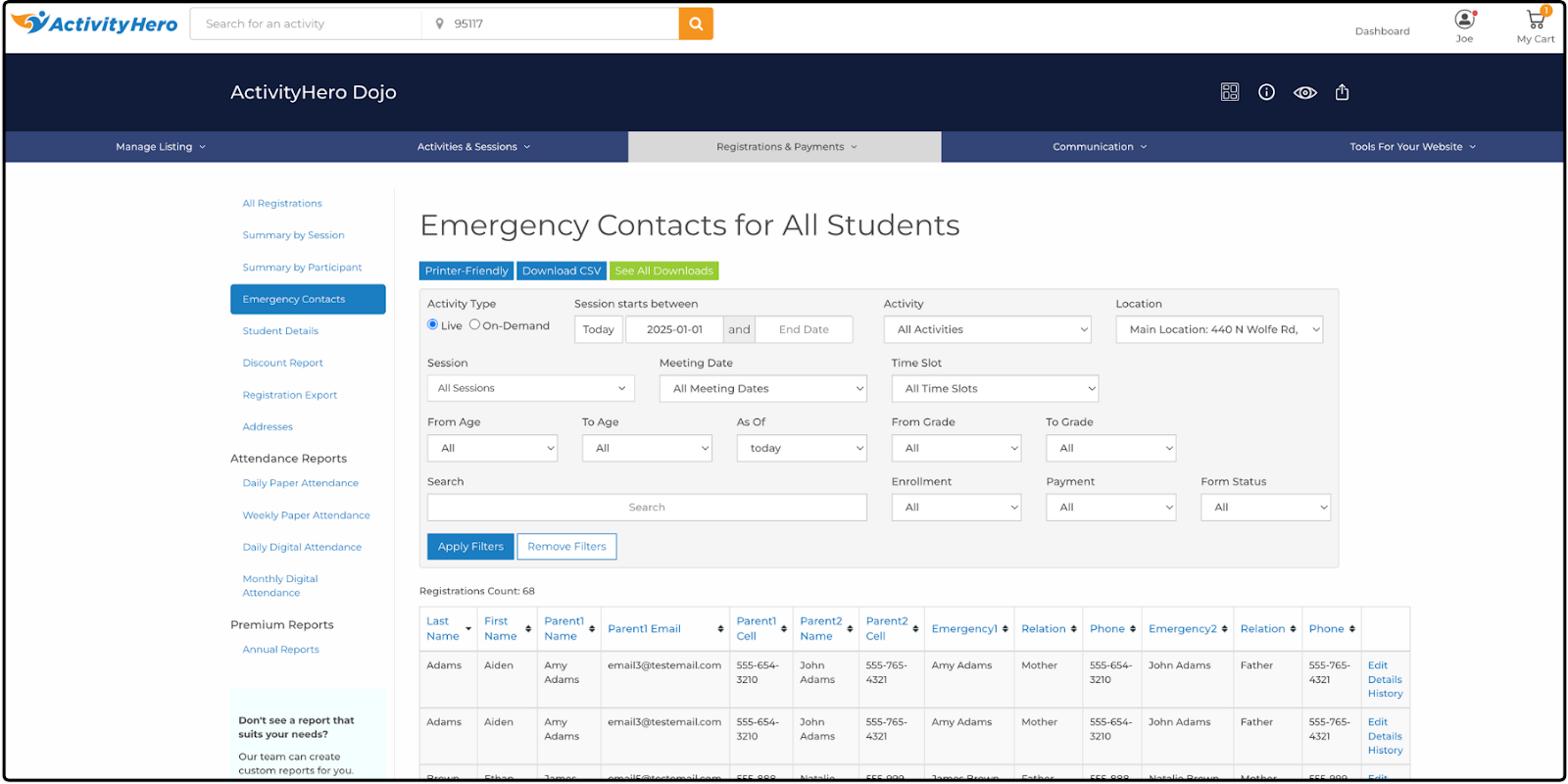
The Emergency Contacts report displays important contact information for each participant, including parent and emergency contact details. You can also print this report to keep a physical copy on hand as a quick-reference directory.
Data displayed in this report includes:
- Last Name
- First Name
- Parent1 Name
- Parent1 Email
- Parent1 Cell
- Parent2 Name
- Parent2 Email
- Parent2 Cell
- Emergency1
- Relation
- Phone
- Emergency2
- Relation
- Phone
- (Last)
- Edit
- Details
- History
Student Details ↑
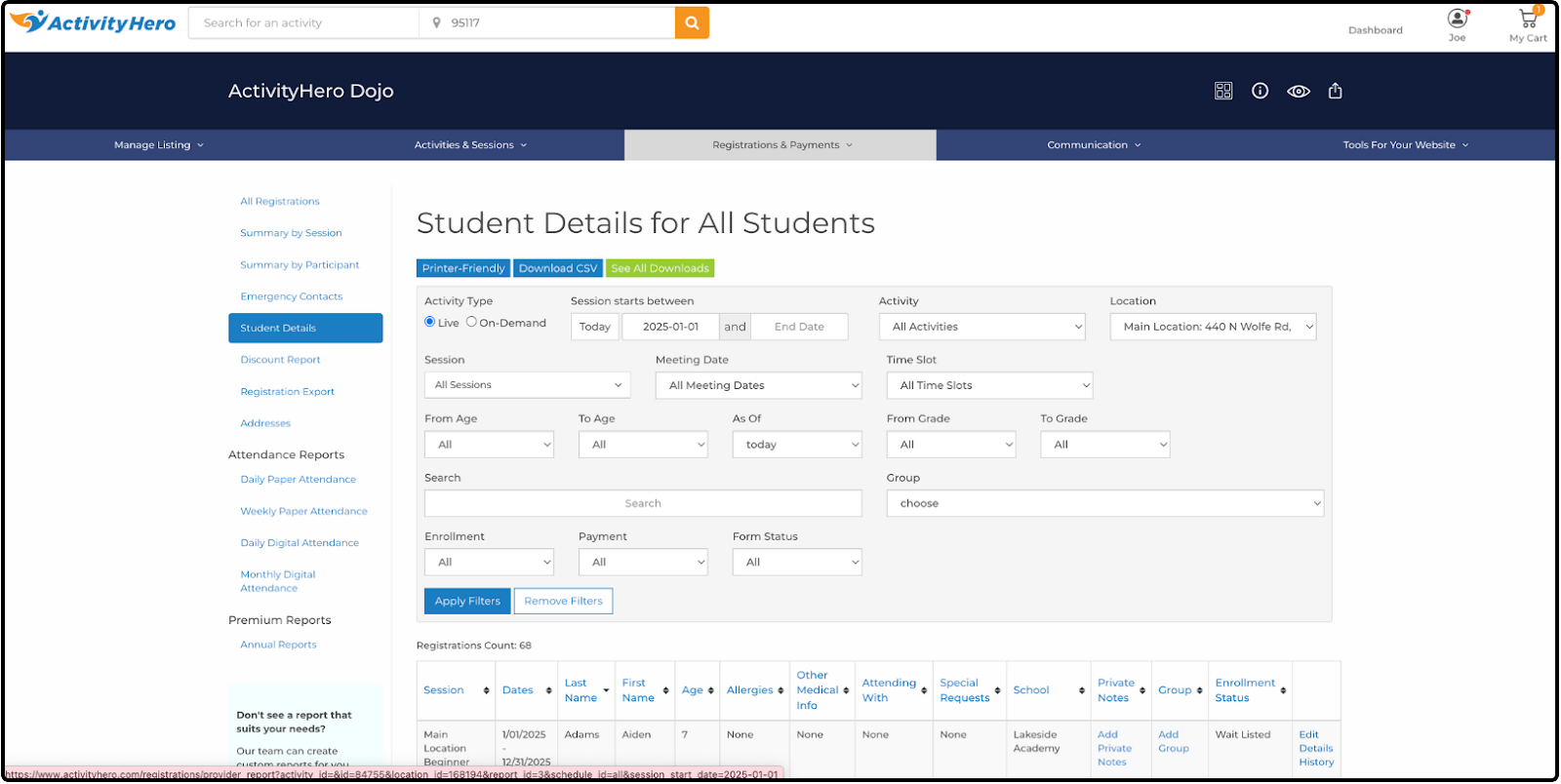
The Student Details report displays participant information relevant to your program's day-to-day activities. It includes medical information, whether the participant is attending with a friend, special accommodations, and a private notes field. The notes field is useful for tracking additional details not collected during registration, such as a participant's performance or behavior in the activity.
Data displayed in this report includes:
- Session
- Dates
- Last Name
- First Name
- Age
- Allergies
- Other Medical Info
- Attending With
- Special Requests
- School
- Private Notes
- Group
- Enrollment Status
- (Last)
- Edit
- Details
- History
Discount Report ↑
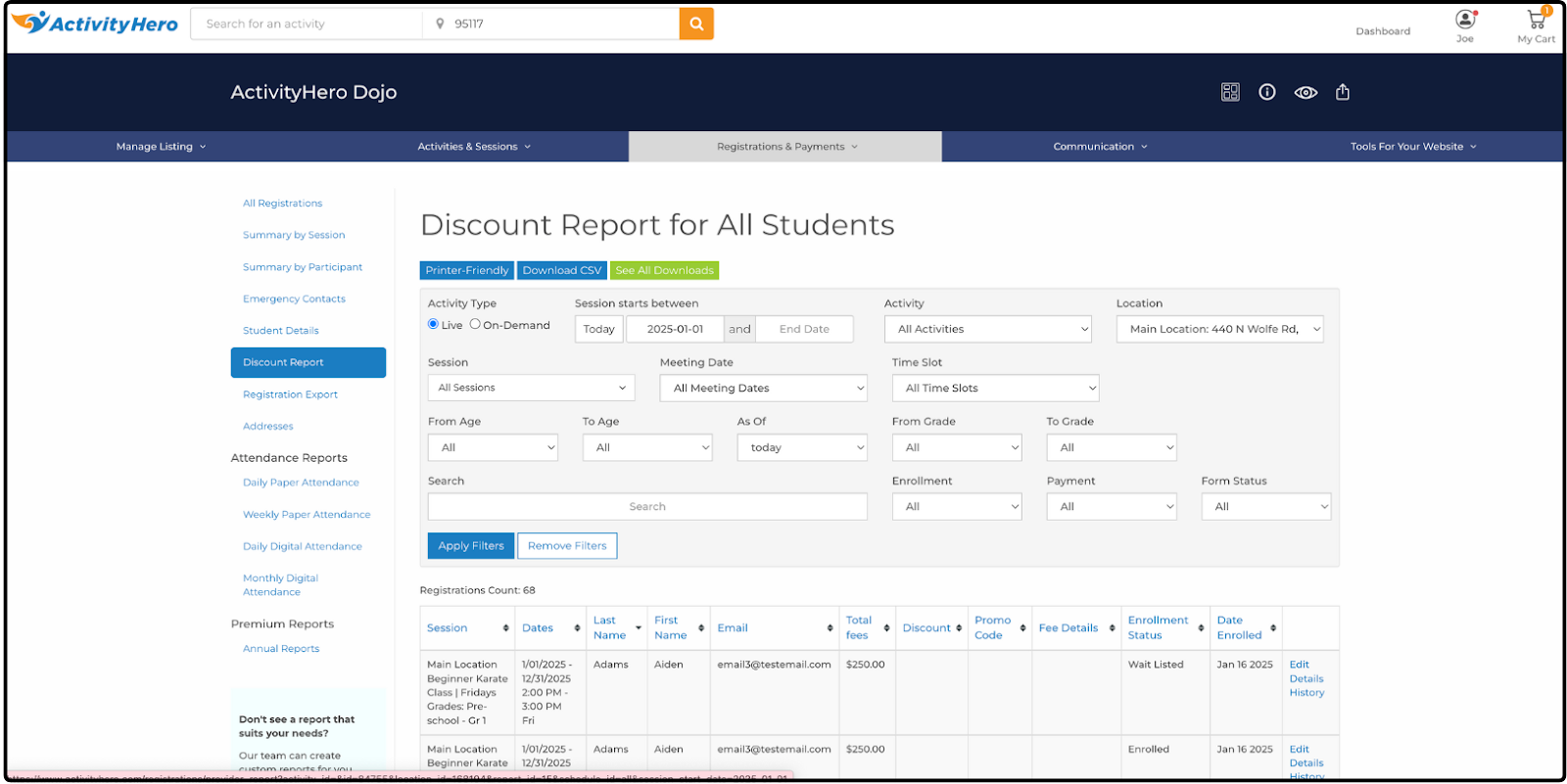
The Discount Report provides a breakdown of all discounts you have offered. It includes details such as discount types and past promo codes. You can also sort the list to group similar discounts, making it easier to find specific information and view totals.
Data displayed in this report includes:
- Session
- Dates
- Last Name
- First Name
- Total fees
- Discount
- Promo Code
- Fee Details
- Enrollment Status
- Date Enrolled
- (Last)
- Edit
- Details
- History
Registration Export ↑
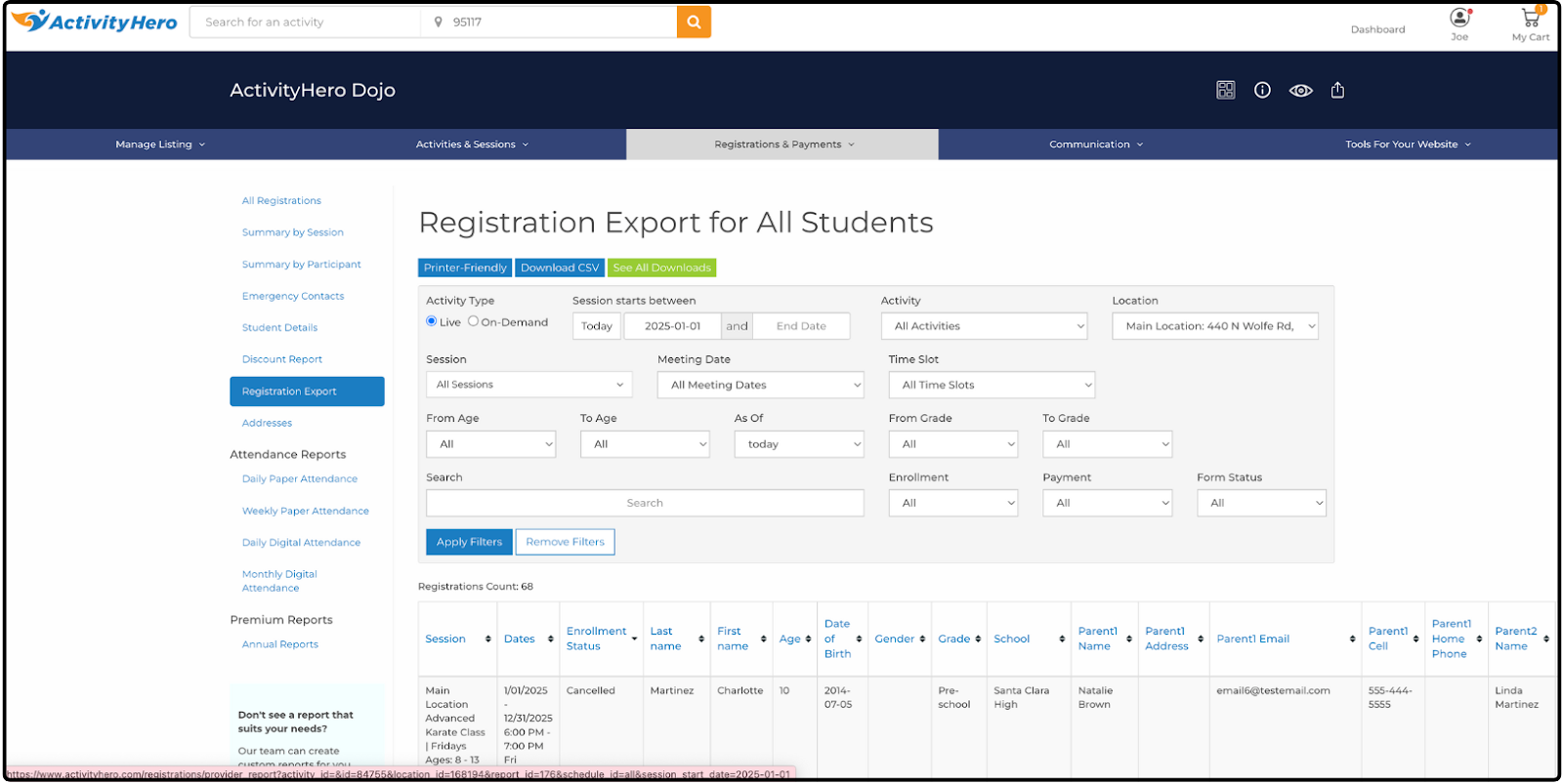
The Registration Export report provides a streamlined view of key registration details. It includes the most relevant columns while excluding ActivityHero-specific data you do not need in an export, such as activity ID, user ID, or registration source. This makes it easier to work with the data in external tools or share with your team.
Data displayed in this report includes:
- Session
- Dates
- Enrollment Status
- Last name
- First name
- Age
- Date of Birth
- Gender
- Grade
- School
- Parent1 Name
- Parent1 Address
- Parent1 Email
- Parent1 Cell
- Parent1 Home Phone
- Parent2 Name
- Parent2 Address
- Parent2 Email
- Parent2 Cell
- Parent2 Home Phone
- Allergies
- Medical Info
- Medical Conditions
- Amount Due
- Amount Paid
- Physician name
- Physician Phone
- Preferred Hospital
- Insurance Co.
- Policy Number
- Emergency Contact1
- Emergency Contact1 Relation
- Emergency Contact1 Home Phone
- Emergency Contact1 Cell
- Emergency Contact2
- Emergency Contact2 Relation
- Emergency Contact2 Home Phone
- Emergency Contact2 Cell
- Attending With
- Special Requests
- Extended care
- Session Location
- Reg Date
- Pickup Contacts
- (Last)
- Edit
- Details
- History
Addresses ↑
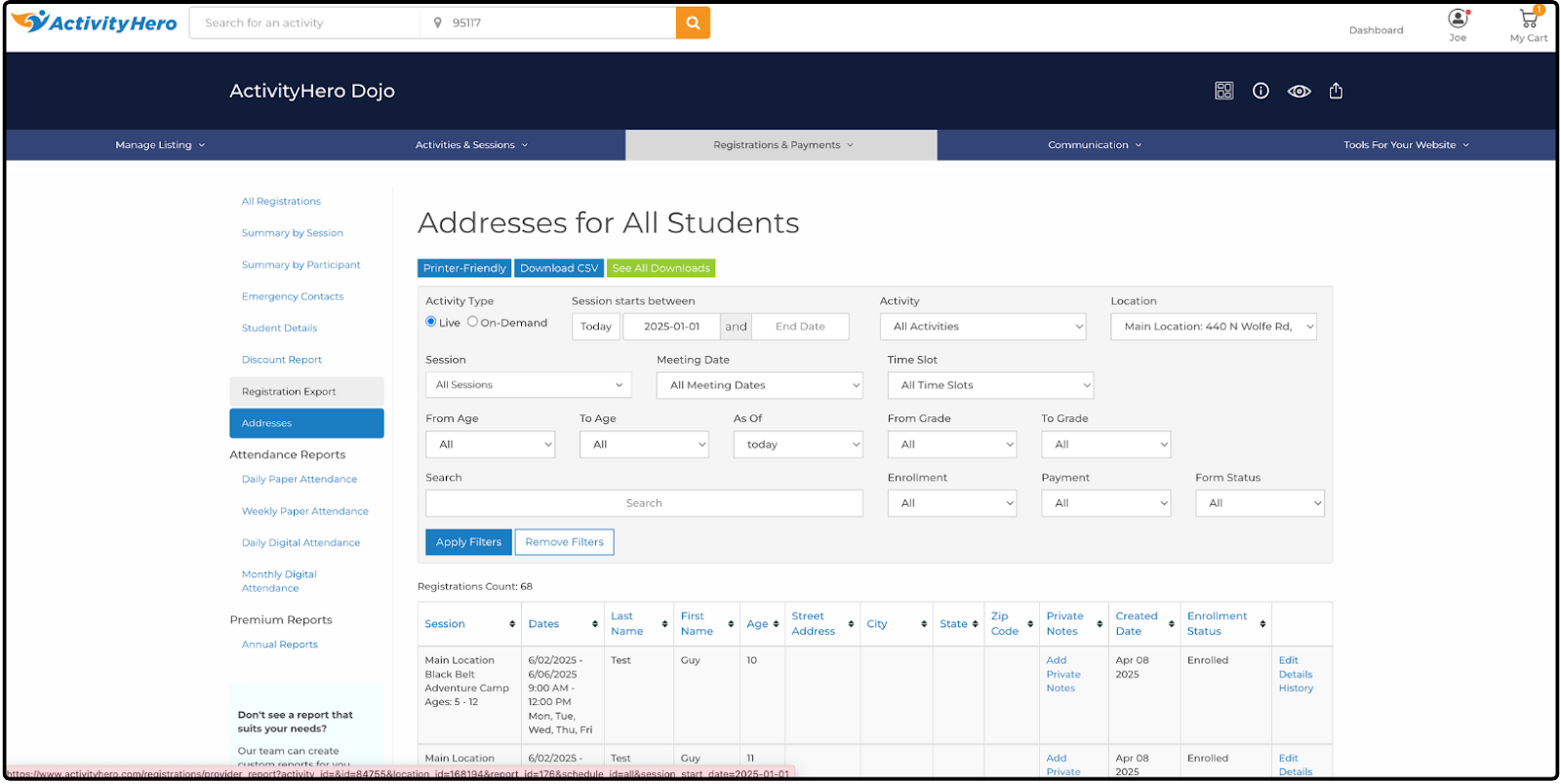
The Addresses report displays participant names, session details, and mailing addresses side by side for quick reference. It is especially useful for sending cards to families or mailing marketing materials.
Data displayed in this report includes:
- Session
- Dates
- Last Name
- First Name
- Age
- Street Address
- City
- State
- Zip Code
- Private Notes
- Created Date
- Enrollment Status
- (Last)
- Edit
- Details
- History
Attendance Reports ↑
The Attendance Reports are useful whether you track attendance with pen and paper or use ActivityHero's Check-in feature. They give you options for both printable attendance sheets and digital attendance tracking.
Daily Paper Attendance
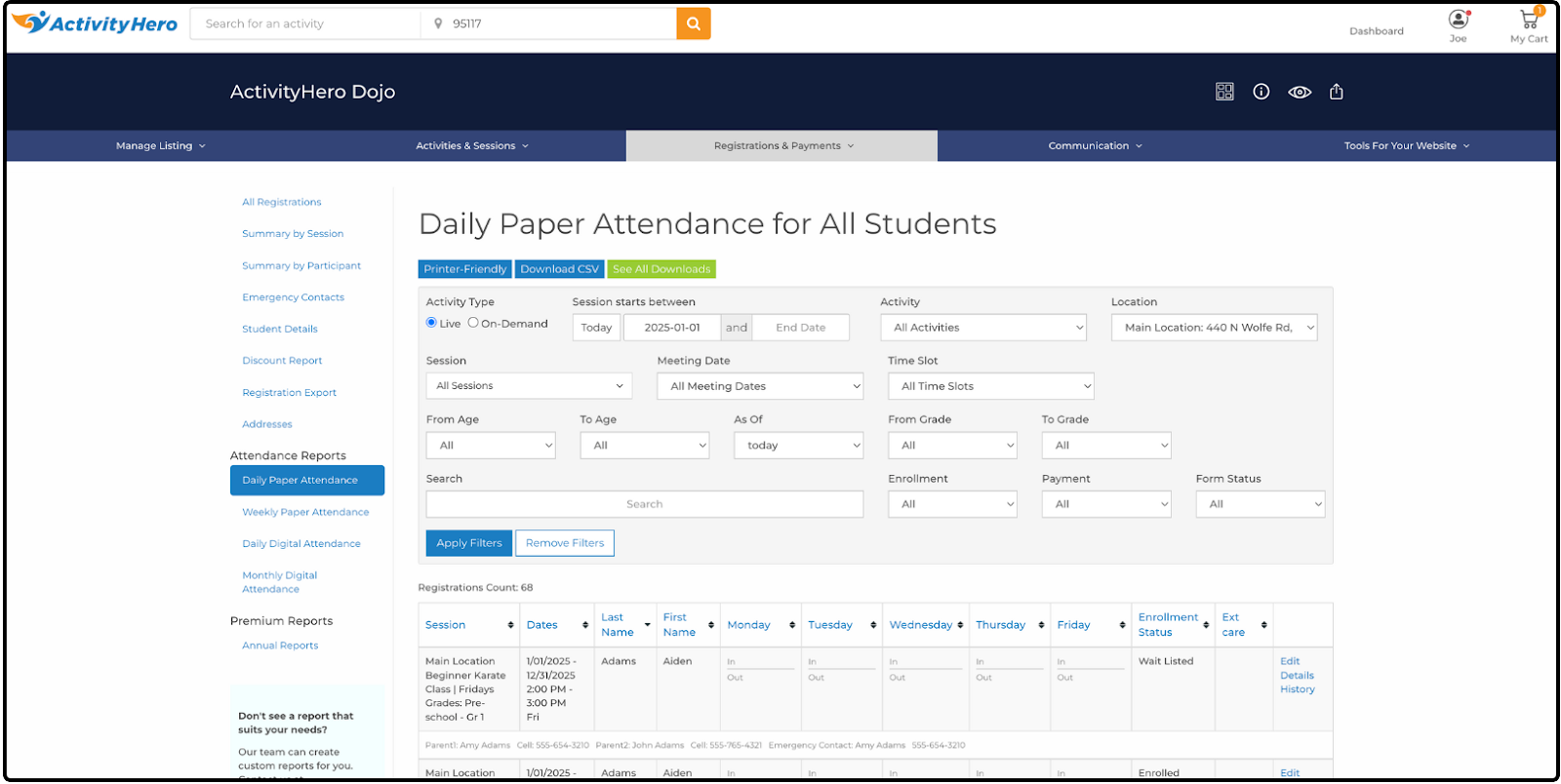
The Daily Paper Attendance Report is designed for programs that use paper to track attendance. It includes space for signatures, indicates whether a participant is in extended care, and provides contact information for each participant, if needed.
Data displayed in this report includes:
- Session
- Dates
- Last Name
- First Name
- Monday
- In/Out
- Tuesday
- In/Out
- Wednesday
- In/Out
- Thursday
- In/Out
- Friday
- In/Out
- Enrollment Status
- Ext care
- (Last)
- Edit
- Details
- History
Weekly Paper Attendance
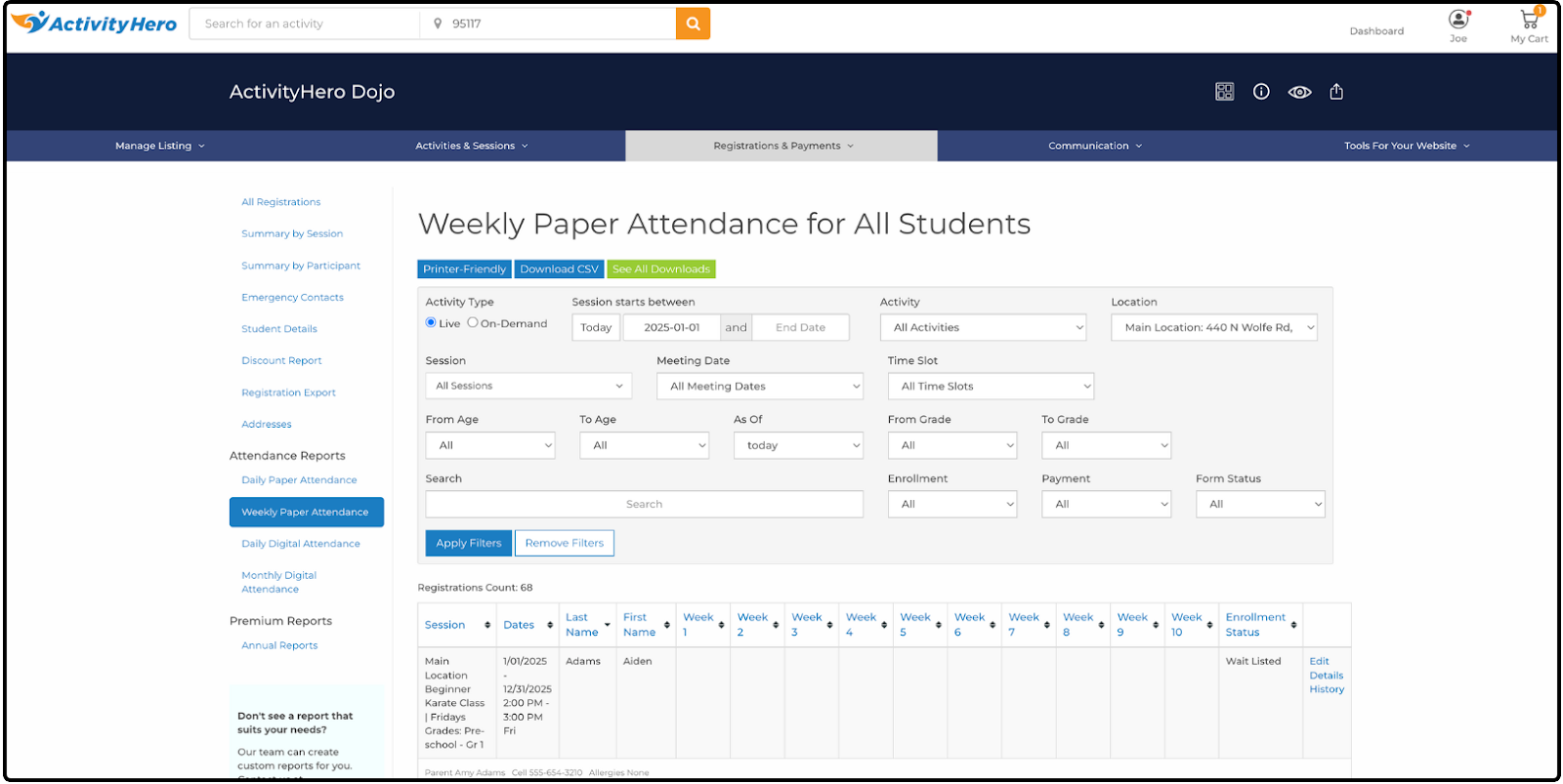
The Weekly Paper Attendance Report is ideal for tracking attendance for sessions that meet once a week.
Data displayed in this report includes:
- Session
- Dates
- Last Name
- First Name
- Week 1
- Week 2
- Week 3
- Week 4
- Week 5
- Week 6
- Week 7
- Week 8
- Week 9
- Week 10
- Enrollment Status
- (Last)
- Edit
- Details
- History
Daily Digital Attendance
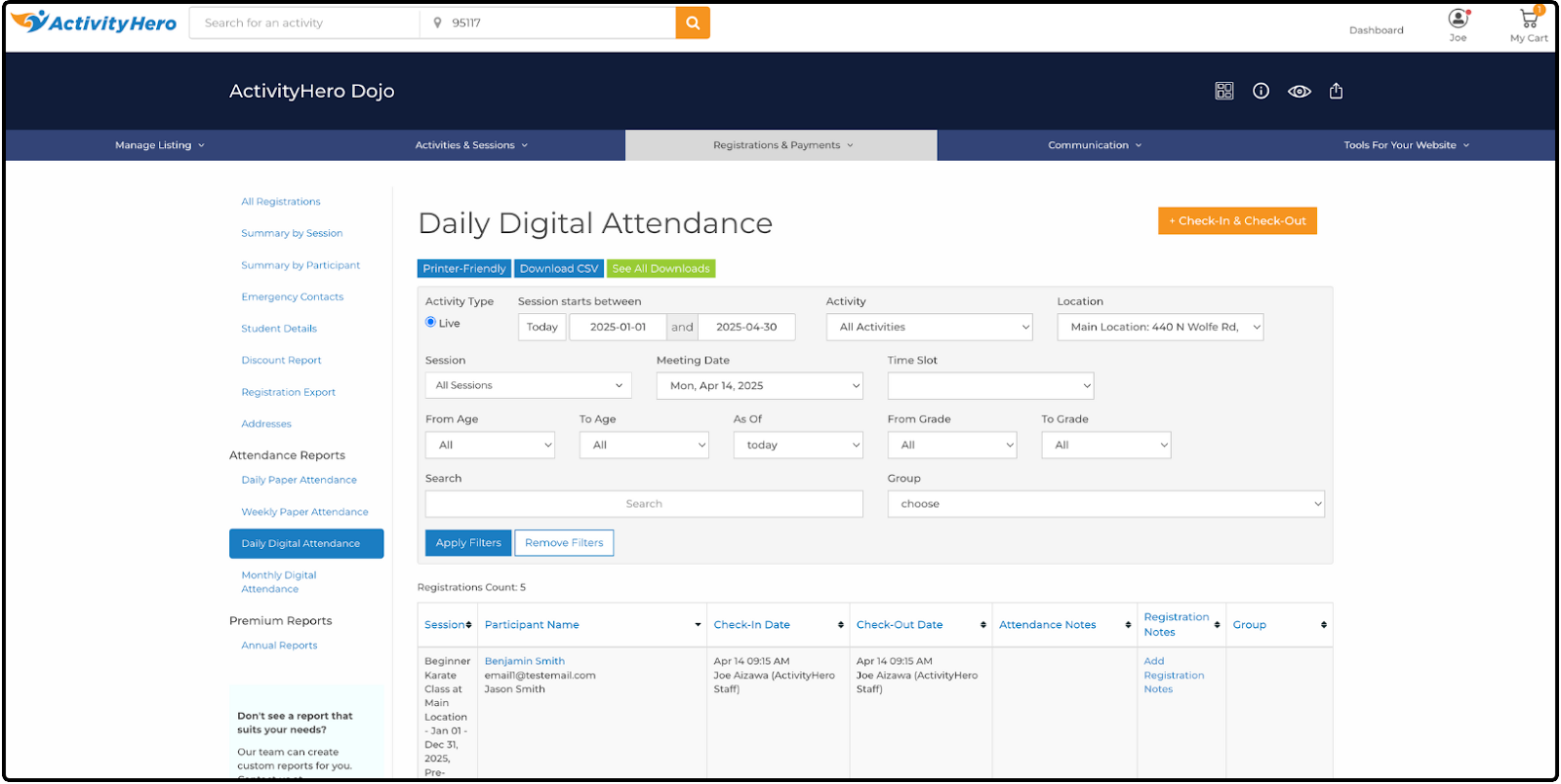
The Daily Digital Attendance Report provides a detailed record of participant attendance for a single day. It includes participant information, attendance activity with signatures and timestamps, and check-in/check-out notes. For more details on digital attendance tracking and this report, check out our help article: How Do I Track Attendance in ActivityHero?
Data displayed in this report includes:
- Session
- Participant Name
- Check-in Date
- Check-out Date
- Attendance Notes
- Registration Notes
- Group
Monthly Digital Attendance
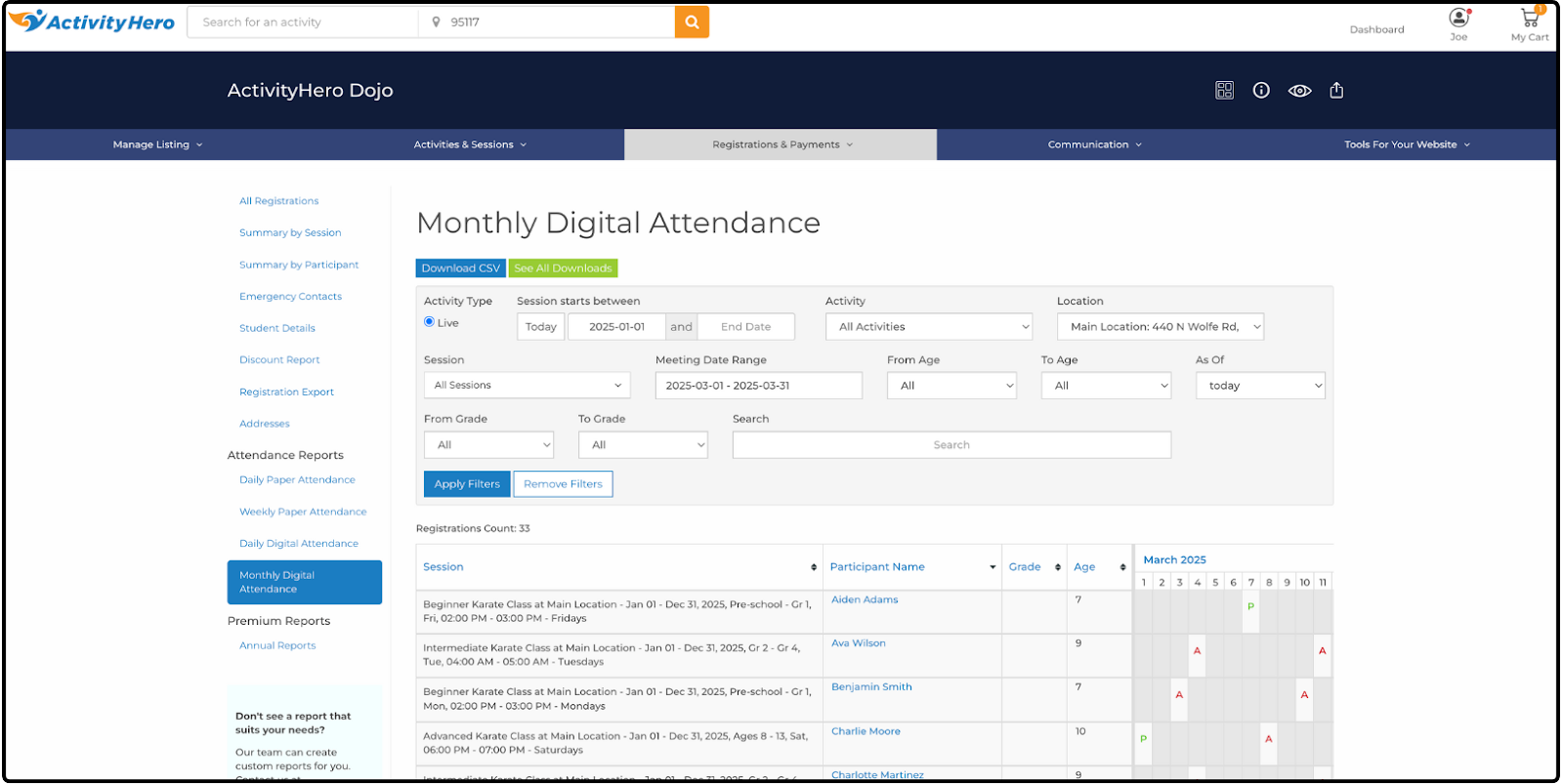
The Monthly Digital Attendance Report provides an overview of attendance for a selected date range. For more details on digital attendance tracking and this report, check out our help article: How Do I Track Attendance in ActivityHero?
Data displayed in this report includes:
- Session
- Participant Name
- Grade
- Age
- Calendar
- Month Year
- Number
- A (Absent) & P (Present)
- Number
- Month Year
Daily Digital Signatures
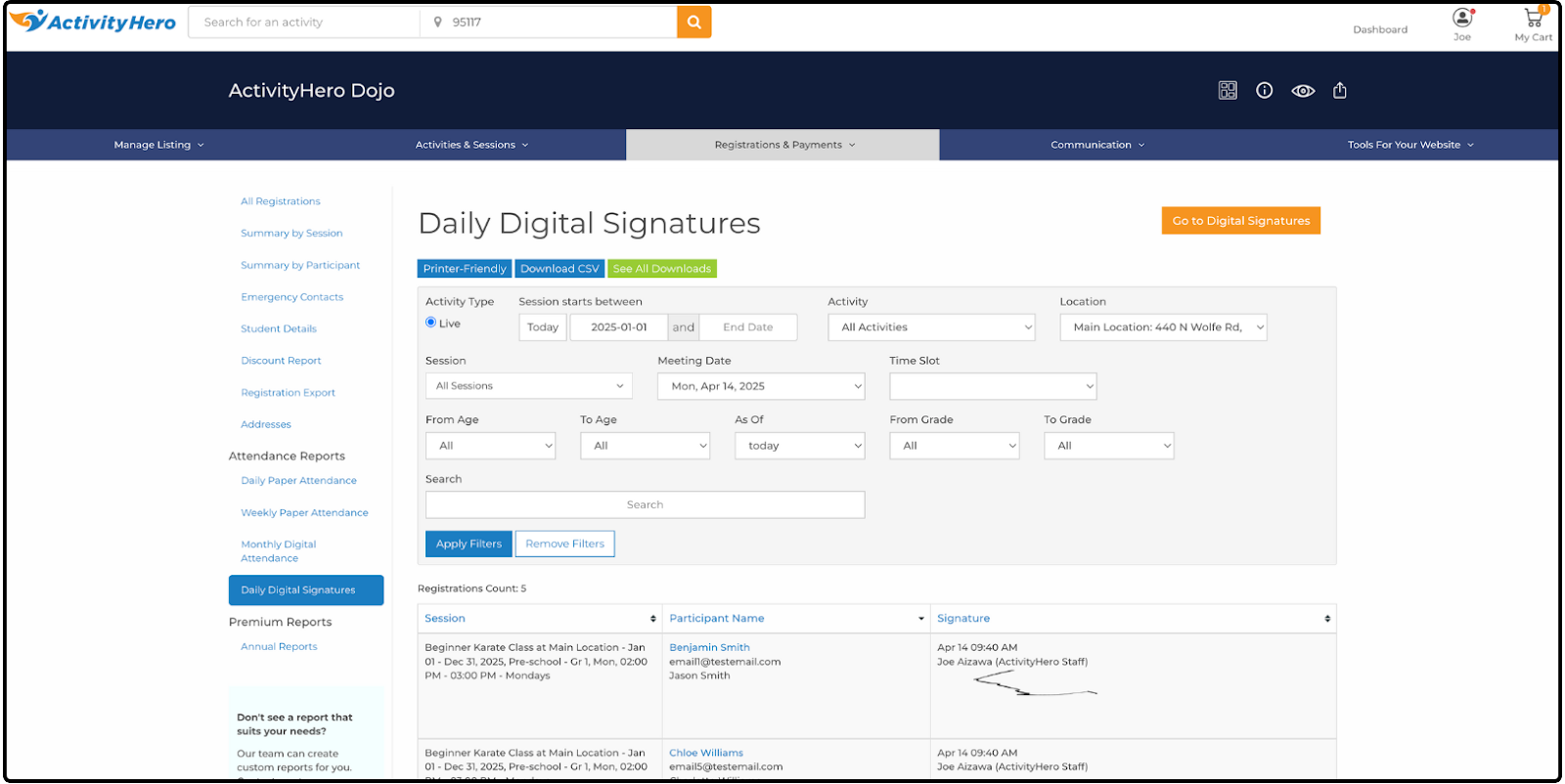
The Daily Digital Signatures report replaces the Daily Digital Attendance report if the digital signatures feature is enabled. This report allows you to view logged signatures along with their corresponding date and time stamps.
Data displayed in this report includes:
- Session
- Participant Name
- Signature
- Date, Time, Signer
Custom Reports ↑
Custom Reports are created when providers need additional or specific reporting, such as custom question data. These reports are similar to standard reports but can be customized to include extra information or combine data from multiple standard reports into one. If you are interested in custom reports, feel free to submit a support request for more information.
Premium Reports ↑
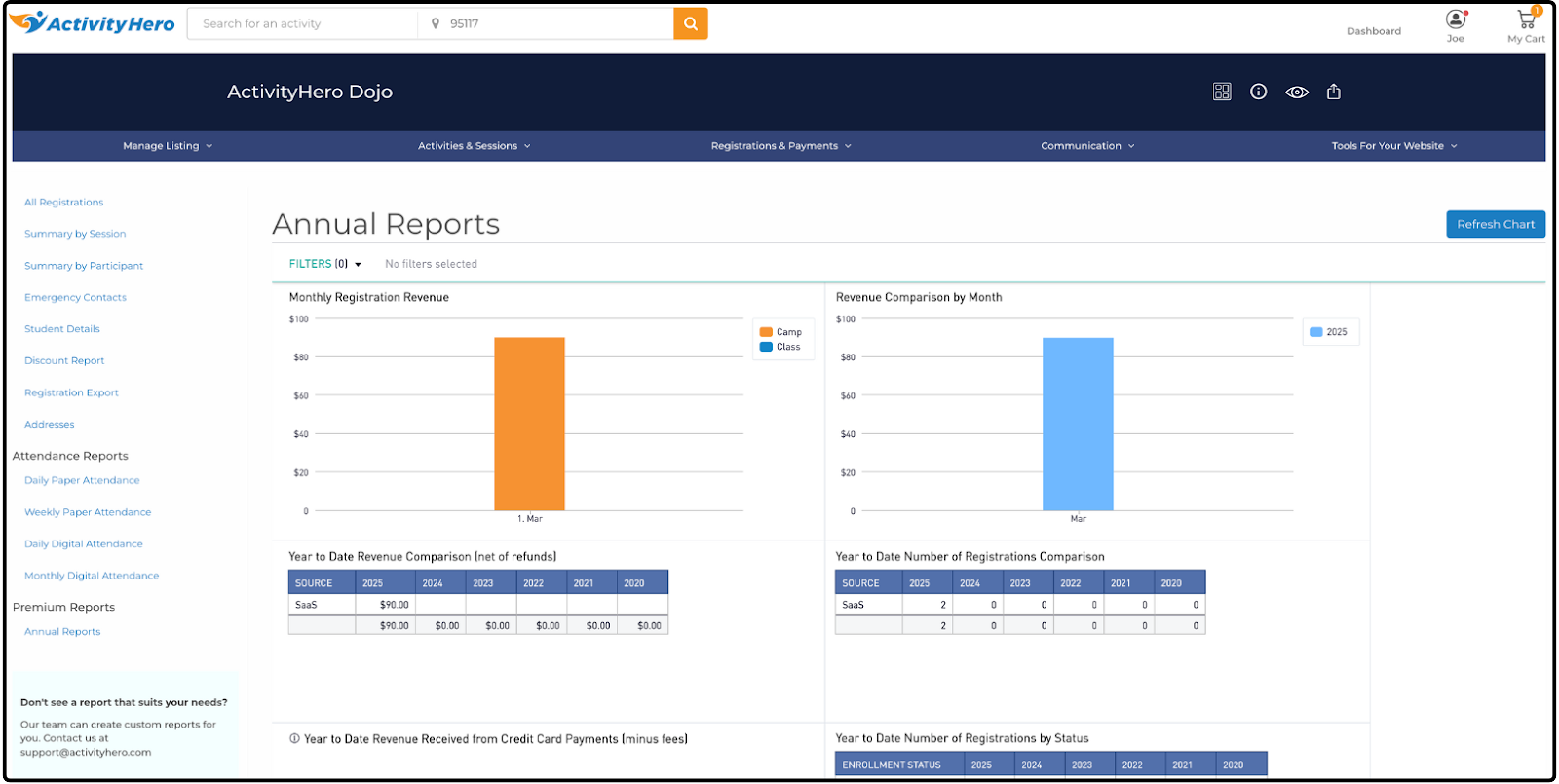
Premium Reports are exclusive to Superhero and Marketing Hero accounts. These reports provide operational data not available in standard reports and include charts and graphs to help analyze data trends. If you are interested in premium reports that you do not currently have access to, feel free to submit a support request for more information.
Annual Reports
- Monthly Registration Revenue
- Revenue Comparison by Month
- Year to date Revenue Comparison (net of refunds)
- Year to Date Number of Registrations Comparison
- Year to Date Revenue Received from Credit Card Payments (minus fees)
- Year to Date Number of Registrations by Status
- Enrolled, Cancelled
- Monthly Revenue by Activity (all payment types)
- Annual Revenue by Activity (all payment types)
- Annual Enrollment by Activity
- Annual Enrollment by Location
- Annual Revenue by Location (net of refunds)
- Annual Revenue by Location
- Totals Per Year
- Registrations per Family
- Waitlisted Families
- Cancelled Registrations
- Annual Revenue by Activity
- Revenue by Session Start Date (filtered by date range)
- Participant's Gender
- Participants' Age at the Time of Registration (filtered by date range)
- Participants' Gender By Age
- Year over Year Registrations By Child Name
- Annual Revenue by Activity Type (net of refunds)
- Top Cities Where Families are From
- Registrations by City & School
- Year to Date Activity Comparison vs 2024
- Registration Data (Filter By Session Start Date)
- Parent email list by child's school
- Stripe - Credit Card Transaction Summary (including refunds)
- WePay Credit Card Transaction Summary (including refunds and fees paid)
- Bookings by Session Start Date (Credit Card)
- Bookings by Session End Date (Credit Card)
- Credits used by month
- Total User Credits Available
- Check/Cash Summary
- User Credits Issued
- Registrations from new vs returning families (monthly)
- Registrations from new vs returning families by year
- Registrations from ActivityHero Marketplace
- Annual Amount Spent on Search and Email Boost
- Activity Pageviews by week
- Activity registrations from Marketplace by week
- Revenue Source by Month
- Boost Deals
- Marketplace Annual Revenue by Activity
- YTD Marketplace Annual Revenue by Activity
- Top States where families are from (your website)
- Top States where families are from (Marketplace)
- Refund Report
- Percent of spots filled by activity type - This year
- Percent of spots filled by activity type - Last year
- Percent of spots filled by activity - Last year
- Last Year's Registrations by Month Paid
- Check-in/Check-out Report (type the meeting_date filter in the format yyyy-mm-dd)
- New Participants this year
- Account Receivable
- Failed Payment Installments
- Promo codes used
- Summary by participant
- Registration by session Week & Activity - Current Year
- Registration by session Week & Activity - Last Year
- Full Year Comparison by Location
- Annual Discounts by Activity
- Users who registered last year but did not register this year
- Users who registered for Summer camp last year but did not register this year
Related Articles ↑
Was this article helpful?
That’s Great!
Thank you for your feedback
Sorry! We couldn't be helpful
Thank you for your feedback
Feedback sent
We appreciate your effort and will try to fix the article