Family Eligibility
How to Offer Scholarship Spots
How Do Families See What Sessions Have Scholarships?
How to Price Scholarships
How to Manage Your Own Scholarship Program Using ActivityHero
Families often ask about scholarships or financial aid, especially for summer camp. The ActivityHero Scholarship Program lets families submit one application per child. If they qualify, they are offered a spot for a reduced price at a participating camp or class. See the announcement of the ActivityHero scholarship program to learn why we believe it is important for all children to be able to attend camp.
Family Eligibility
ActivityHero's scholarship application includes questions about household income, number of household members, free or reduced lunch eligibility, and other financial considerations. The applicant must provide income verification by submitting a copy of their free/reduced lunch qualification letter, recent tax returns, pay stubs, or unemployment documentation. A sliding scale is used to determine the family's participation fee.
How to Offer Scholarship Spots ↑
Your program can participate in the ActivityHero Scholarship Program by typing the number of scholarship spots you want to offer for each session on your ActivityHero Dashboard. (If you have your own scholarship program, see the next section.)
Navigate to Activities & Sessions > Sessions & Content Manager, then look for the Add ActivityHero Scholarship Spots field.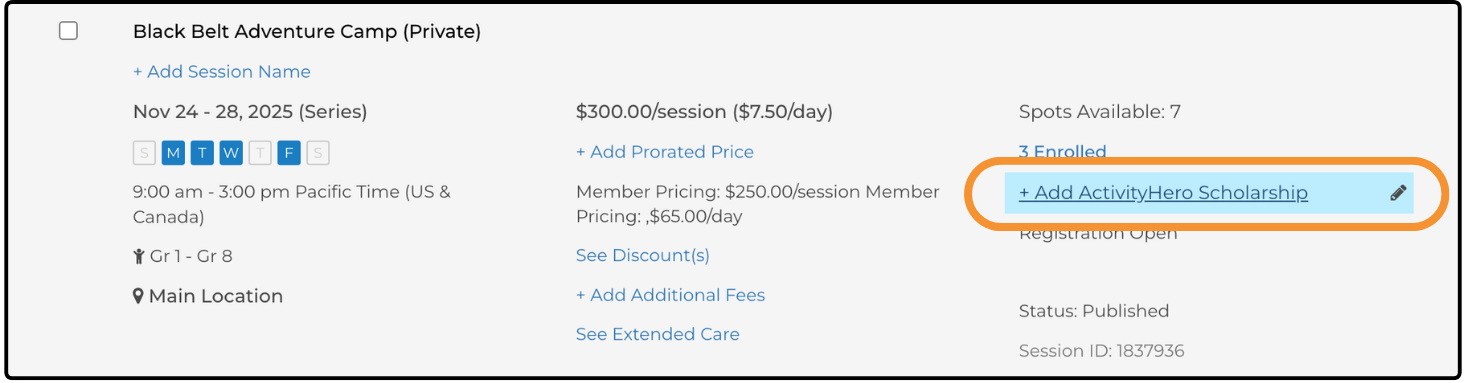
After typing the number of ActivityHero Scholarship Spots, you are asked to type the lowest scholarship price required to accommodate the participant for the session. The recommended range for scholarship prices is displayed. Setting a lower price helps more children attend.
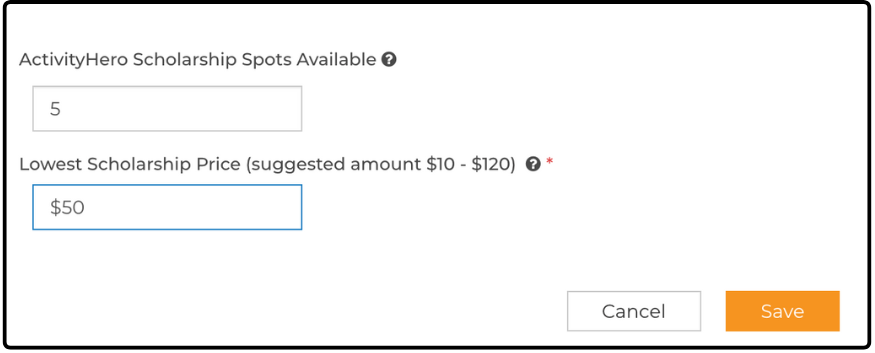
ActivityHero's team uses this information to match scholarship applicants with your program. The registrations appear in your Registration Reports just like any other registration. To offer the family the scholarship price, a promo code discount is created for one-time use at the available session.
When contributing funds are used to pay for the child's registration fee, you see a payment from ActivityHero Scholarship in your registration report.
For example, this camp (normally $295) offered a lowest scholarship price of $70 and a promo code was created for $225. The family could only afford to pay $20, so a $50 ActivityHero scholarship was given to the family. The camp received two payments: $20 from the family and $50 from ActivityHero.
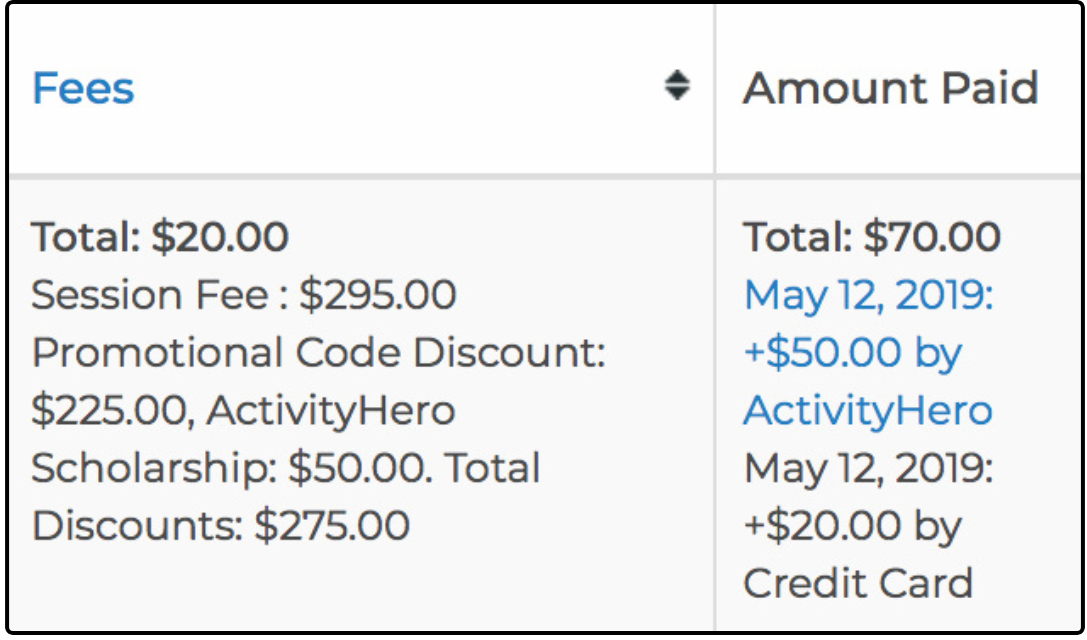
ActivityHero marketing and registration fees are deducted from scholarship registrations, but only on the amount you receive for the completed registration.
As families register for scholarship spots, we reduce the number of scholarship spots available. If you no longer have scholarship spots for the camp session, clear the ActivityHero Scholarship Spots field.
How Do Families See What Sessions Have Scholarships? ↑
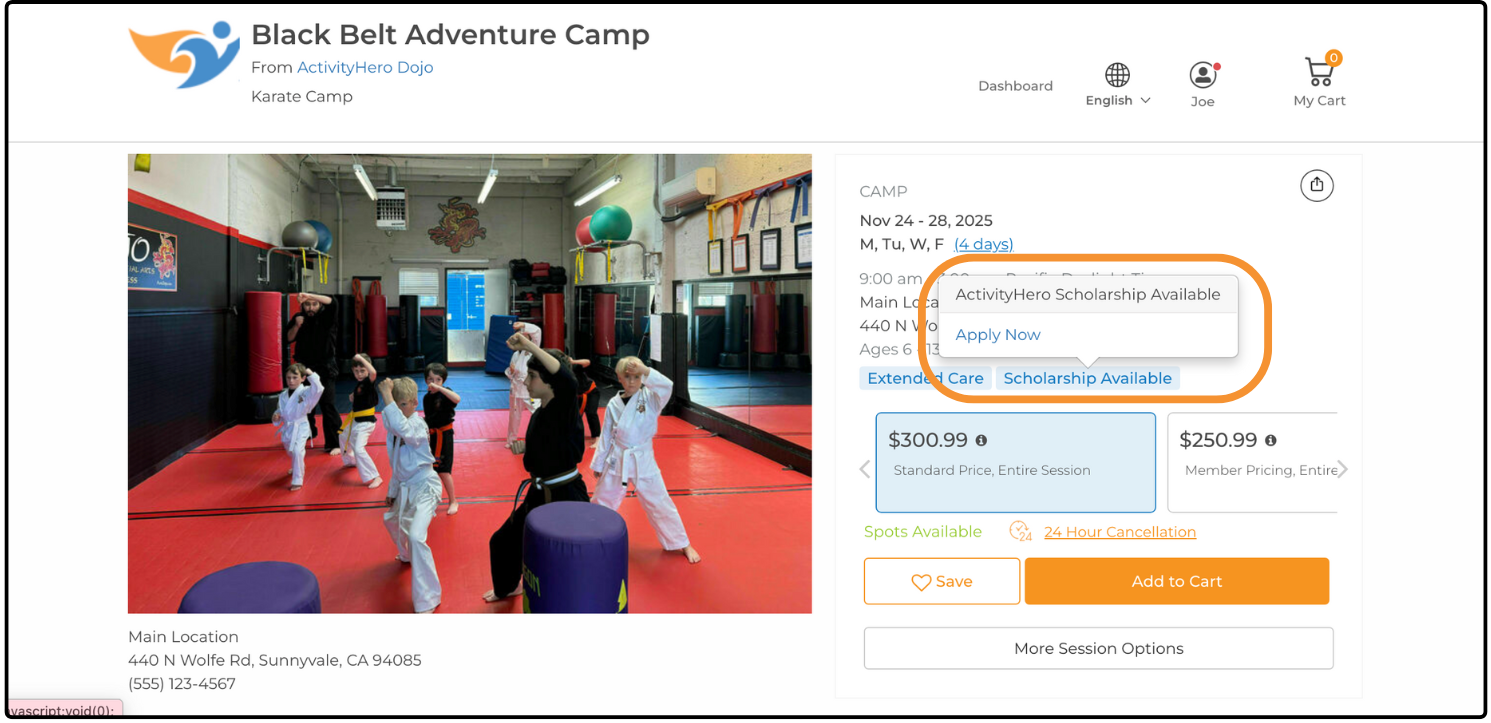
Families can see which sessions have scholarships by viewing the activity schedule. A Scholarship Available link is displayed if scholarship spots are being offered for that session. Families can apply through the scholarship application.
If you have any further questions about the scholarship program, submit a support request.
How to Price Scholarships ↑
How to Manage Your Own Scholarship Program Using ActivityHero ↑
Programs that want to manage their own scholarship or financial aid program typically have one Activity to collect full price registrations and a separate Activity to collect scholarship applications. By using a separate Activity, they can have a separate scholarship registration form that includes income and other questions as needed.
Families who apply for a scholarship can be viewed in the Registration Reports. When applicants are approved by the program's staff, they can move the applicants into the desired session to have a consolidated list of participants. The Invoice feature can be used to ask the applicants to pay a reduced fee for the session.
To learn more about managing your own scholarship program, submit a support request.
Related Articles ↑
Was this article helpful?
That’s Great!
Thank you for your feedback
Sorry! We couldn't be helpful
Thank you for your feedback
Feedback sent
We appreciate your effort and will try to fix the article