Add multiple discounts to ActivityHero using import templates. Save time and streamline your setup process by uploading all your discounts in bulk with just a few simple steps.
Import Discounts
Common Discount Validation Errors
Discount Data Fields
Promo Code CSV
Early Discounts CSV
For an overview of importing in ActivityHero, and how locations, activities, sessions, and other data relate to each other, see our help article How do I import data into ActivityHero?
Import Discounts
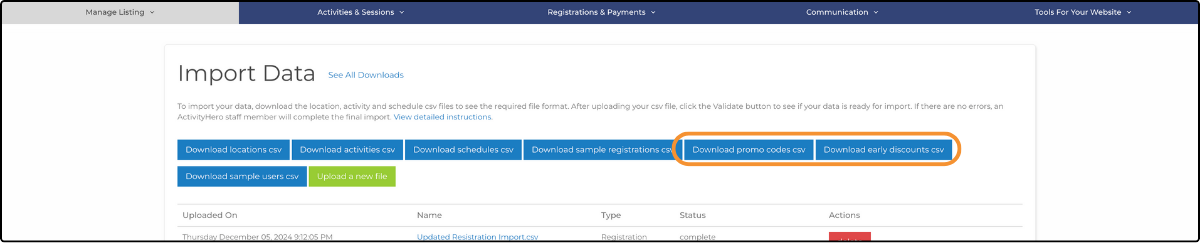
1. Download promo codes or early discounts by clicking Download promo codes csv or Download early discounts csv. The downloaded file contains your current promo codes or early discounts in ActivityHero.
2. Edit the CSV file and add your updated information.
- Discount_id - ActivityHero uses this field to determine whether an existing discount is updated or a new discount is added.
- Update a discount - Find the discount you would like to update. Make your updates to the discount without changing the discount_id. If the file contains a discount_id that matches an existing discount in ActivityHero, the associated information is updated and no new discount is created.
- Create a discount - Type your new discount information on the next free line in the spreadsheet. Leave the discount_id blank. ActivityHero automatically creates a discount_id after upload.
3. Upload your CSV file by clicking Upload a new file. Select the Promo Code or Early Discount file type.
4. After uploading your CSV file, click Validate to check whether your data is ready for import.
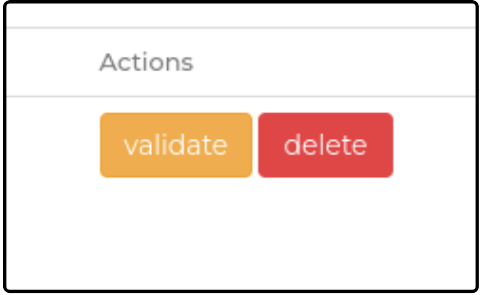
5. If there are errors, Validation Failed is displayed. Click View Report to inspect the reason for the failure. Correct any errors, and then repeat step 3. For tips on frequent validation errors, see the section below.
6. When the file is validated successfully, the green Run option becomes available. Click Run to begin importing your information. This can take a few minutes, and changes might not be displayed in the marketplace right away.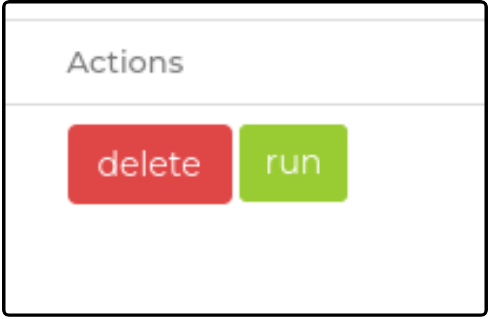
Common Discount Validation Errors ↑
Below is a list of common validation errors and how you might address them:
Missing Session IDs: Discounts without session IDs are created but not assigned to any sessions, making them unavailable during registration.
Duplicate Promo Codes: Promo codes must be unique and cannot be reused. Attempting to use a previously created code results in an error.
Discount Data Fields ↑
Data fields (* required fields)
Promo Code CSV ↑
- discount_id
- promo_code_name
- promo_code *
- discount_type (promo code) *
- promo_code_description *
- expiration_date (MM/DD/YYYY) *
- activity_type (Camp, Class, Birthday Party)
- discount_amt *
- combinable (true or false) *
- amt_in (dollars, percent) *
- num_of_promo_codes (Maximum number of valid promo codes)
- min_spend (Minimum amount to be spent for the promo code to be applicable)
- apply_amt_to (entire_registration_amount, session_price_only, extended_care_only, session_and_ex_care_only) *
- session_ids (all, or a comma-separated list of the session IDs for which the promo code is valid. all applies this promo code to all upcoming sessions for this provider)
- min_num_of_sessions
- apply_to_all_sessions (true or false)
- min_num_of_siblings
- apply_to_all_siblings (true or false)
- apply_to_entire_family (true or false)
- allow_multiple_per_family (true or false)
- internal_notes
- valid_for_new_accounts_only (true or false)
- overlap_period_type
- recurring (true or false)
- single_days (true or false) *
- entire_session (true or false) *
Early Discounts CSV ↑
- discount_id *
- name
- discount_type (early bird) *
- description *
- expiration_date (MM/DD/YYYY) *
- activity_type (Camp, Class, Birthday Party)
- discount_amt *
- combinable (true or false) *
- amt_in (dollars, percent) *
- num_of_promo_codes (Maximum number of valid promo codes)
- min_spend (Minimum amount to be spent for the promo code to be applicable)
- apply_amt_to (entire_registration_amount, session_price_only, extended_care_only, session_and_ex_care_only) *
- session_ids (all, or a comma-separated list of the session IDs for which the promo code is valid. all applies this promo code to all upcoming sessions for this provider)
- min_num_of_sessions
- max_num_of_sessions_for_percent_discount
- apply_to_all_sessions (true or false)
- min_num_of_siblings
- apply_to_all_siblings (true or false)
- apply_to_entire_family (true or false)
- allow_multiple_per_family (true or false)
- internal_notes
- valid_for_new_accounts_only (true or false)
- overlap_period_type
- recurring (true or false)
- single_days (true or false) *
- entire_session (true or false) *
If you have questions or problems, submit a support request.
Related Articles ↑
Was this article helpful?
That’s Great!
Thank you for your feedback
Sorry! We couldn't be helpful
Thank you for your feedback
Feedback sent
We appreciate your effort and will try to fix the article